
If you are comparing dental imaging software for your practice, one of the first questions is probably simple: How much does dental imaging software cost?
The answer depends heavily on what you need the software to do.
Dental imaging can describe everything from diagnostic X-ray and CBCT platforms to cosmetic dentistry imaging software designed to help patients visualize potential treatment outcomes. Pricing can range from relatively affordable monthly subscriptions to thousands of dollars in upfront software, hardware, implementation, and support costs.
For dental practices evaluating their options, the advertised price is only part of the equation. You also need to consider licensing, training, hardware requirements, additional users, updates, support, and how the software fits into your existing patient consultation workflow.
This guide explains the major dental imaging software pricing models, the costs practices should look for, and how to determine whether the investment makes financial sense.
How Much Does Dental Imaging Software Typically Cost?
There is no single standard price for dental imaging software.
Depending on the type of platform, a dental practice may encounter:
- Monthly or annual subscriptions
- Per-provider or per-user pricing
- Per-location pricing
- One-time perpetual licenses
- Annual maintenance or support fees
- Setup and implementation charges
- Data migration fees
- Hardware and server costs
- Fees for additional workstations or seats
- Usage-based charges
The difference can be substantial.
Some cloud dental platforms publish plans around $100 per month, while more comprehensive dental practice and imaging platforms can cost several hundred dollars or more per month. Certain on-premise or specialized imaging systems may also require a significant upfront investment in licenses, servers, imaging equipment, and IT infrastructure.
That is why practices should compare total cost of ownership, not simply the number displayed on a pricing page.
What Are the Most Common Dental Imaging Software Pricing Models?
Most dental imaging platforms use one or a combination of several pricing structures.
1. Monthly Subscription
A monthly subscription gives the practice access to the software for a recurring fee.
This can be attractive for practices that want to minimize the initial investment or evaluate a new technology before making a larger commitment.
The advantage is predictable monthly spending. The disadvantage is that the payments continue for as long as the practice uses the software.
For example, software priced at $100 per month represents approximately $6,000 in subscription costs over five years if the price remains unchanged.
When comparing monthly plans, ask whether the advertised price covers the entire practice, one provider, one workstation, or one location.
2. Annual Subscription
Annual subscriptions typically require the practice to pay for a full year of access at once.
Vendors may offer a lower effective monthly cost for practices willing to make an annual commitment.
If your team already knows it will use the software consistently, an annual plan can potentially reduce the total cost compared with paying month to month.
Before choosing an annual plan, verify the renewal terms and whether future price increases can affect your subscription.
3. Perpetual or Lifetime License
A perpetual license generally involves a larger upfront payment in exchange for long-term use of the software.
This pricing model can become attractive when a practice expects to use the same platform for several years.
However, “perpetual” does not always mean that every future expense disappears.
Ask whether software updates, technical support, cloud services, upgrades, additional workstations, or new versions require separate payments.
A true comparison should therefore look beyond the initial license price.
Subscription vs. Perpetual License: Which Costs Less?
The answer depends primarily on how long you expect to use the software and what is included with each option.
Suppose a platform offers both subscription and perpetual licensing. A monthly subscription may require less money upfront, making it easier to introduce the software into the practice.
A lifetime option requires a larger initial investment but may have a lower long-term software cost if the practice continues using it for many years.
Office managers can compare the options using a simple calculation:
Monthly subscription cost × 12 × expected years of use
Then compare that figure with the cost of a perpetual license plus any required support, maintenance, or upgrade expenses.
For example, a $99 monthly subscription would equal:
- 1 year: $1,188
- 3 years: $3,564
- 5 years: $5,940
This does not automatically mean a lifetime license is the better choice. Cash flow, flexibility, included services, expected usage, and the possibility of changing platforms should all be considered.
Diagnostic Imaging Software and Cosmetic Simulation Software Are Not the Same
One of the most important distinctions when comparing dental imaging software costs is what the software is actually designed to accomplish.
Diagnostic Dental Imaging Software
Diagnostic imaging software may be used to capture, store, display, enhance, or manage clinical images from technologies such as:
- Digital X-rays
- Intraoral sensors
- Panoramic imaging systems
- CBCT systems
- Intraoral cameras
These platforms can require integrations with imaging hardware, practice management systems, local servers, cloud storage, or other clinical technology.
As a result, the software license may represent only one portion of the total investment.
Cosmetic Dentistry Imaging Software
Cosmetic dentistry imaging software serves a different purpose.
Instead of functioning primarily as a diagnostic imaging system, cosmetic simulation software helps the practice visually communicate potential treatment outcomes to patients.
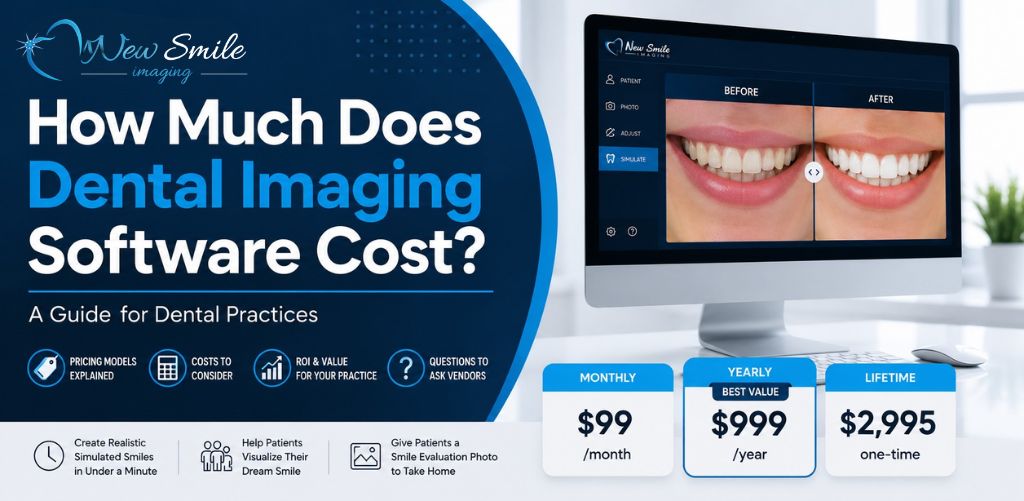
SNAP from New Smile Imaging, for example, creates realistic cosmetic “Before and After” simulated images in less than a minute. A practice can use the simulation during the patient consultation and provide a SNAP Smile Evaluation Photo that the patient can take home and share with a spouse, family members, or friends.
For practices focused on cosmetic dentistry, this means the software should not be evaluated only as another technology expense. It should also be evaluated according to how effectively it supports patient communication and treatment presentations.
What Implementation and Training Costs Should You Expect?
Implementation is an area where seemingly affordable software can become more expensive.
Before purchasing a platform, ask whether the quoted price includes:
- Initial setup
- Software installation
- Staff onboarding
- Training
- Technical support
- Practice management integration
- Data migration
- Future updates
Training deserves particular attention.
A sophisticated system may offer dozens of features, but those features provide little value if only one person in the practice knows how to use them.
The practical question is not simply, “What can this software do?”
It is:
How quickly can our team actually use it with patients?
New Smile Imaging designed SNAP with a relatively simple workflow and provides training resources and short video tutorials to help staff learn the software. That can be especially important when a practice wants dental assistants, treatment coordinators, or other team members to incorporate smile simulations into routine patient interactions.
Does Dental Imaging Software Charge Per User or Per Seat?
Some dental software companies price their products according to the number of users, providers, workstations, or locations.
A price that initially looks attractive can change considerably when you discover that it only includes one user.
Ask vendors specifically:
Is this price per practice, per location, per provider, per workstation, or per user?
Then calculate what the software will cost based on the way your practice will actually deploy it.
This becomes especially important for group practices and DSOs. A five-location organization should not build a budget based on a price intended for one workstation in one office.
SNAP’s currently published monthly, annual, and lifetime pricing is for a single-seat license, so practices that need a different licensing arrangement should confirm their requirements before purchasing.
Will You Need New Hardware?
Hardware can dramatically change the economics of dental technology.
Depending on the type of diagnostic imaging system being purchased, a practice could potentially need compatible:
- Sensors
- Cameras
- Scanners
- X-ray equipment
- CBCT equipment
- Servers
- Workstations
- Monitors
- Backup systems
- Networking equipment
There may also be ongoing IT, storage, maintenance, or replacement costs.
Cosmetic simulation software can have a different cost structure because its primary function is patient visualization rather than acquiring diagnostic radiographs.
When comparing vendors, ask for the minimum and recommended hardware requirements and identify anything your practice would need to purchase separately.
What Hidden Dental Imaging Software Costs Should You Ask About?
Never evaluate dental software using the advertised subscription price alone.
Before signing an agreement, ask whether there are additional charges for:
- Setup or activation
- Training
- Data migration
- Additional users or workstations
- Additional providers
- Additional locations
- Software updates
- Technical support
- Cloud storage
- Backups
- Integrations
- Hardware
- Annual maintenance
- Cancellation
- Contract renewal
- Upgrading to a newer version
You should also ask whether the price is introductory.
A $99 monthly price that becomes $199 after the first year is very different from a $99 plan that remains at the published rate unless the vendor changes its general pricing.
Get the full cost structure before calculating ROI.
How Should a Dental Practice Calculate Software ROI?
The cheapest software is not necessarily the software with the best return.
ROI asks a different question:
What measurable value does the practice receive compared with what it spends?
For cosmetic dentistry imaging software, one useful calculation is:
Additional gross profit attributable to cases influenced by the software − software cost = estimated financial return
You can also calculate a basic ROI percentage:
(Estimated financial return ÷ software cost) × 100
Be conservative when estimating the revenue attributable to the software. A smile simulation may support a consultation, but many factors influence whether a patient ultimately accepts treatment.
A Simple Break-Even Example
Imagine a practice pays $999 per year for cosmetic simulation software.
Rather than asking, “Is $999 expensive?” ask:
How many additional cosmetic cases would need to be accepted during the year for the software to cover its cost?
If the practice earns $1,000 in contribution margin from one additional case that can reasonably be attributed in part to improved treatment presentation, approximately one such case could cover the annual software expense.
That does not guarantee the software will generate an additional case. It simply gives the practice a much more useful way to evaluate the investment.
For cosmetic practices presenting veneers, implants, whitening, smile makeovers, and other elective treatments, the break-even point may therefore be worth calculating before choosing a platform.
What Does SNAP Dental Imaging Software Cost?
New Smile Imaging publishes straightforward pricing for SNAP cosmetic simulation software.
Current published pricing is:
| SNAP License | Price |
|---|---|
| Monthly Subscription | $99/month |
| Yearly Subscription | $999/year |
| Lifetime License | $2,995 one-time |
Each published option is currently listed as a single-seat license.
The annual plan also provides a straightforward savings opportunity compared with paying monthly.
At $99 per month, 12 months would total $1,188.
The $999 annual plan therefore saves $189 per year compared with 12 monthly payments at the currently published prices.
For practices considering the lifetime license, the long-term comparison becomes even more interesting.
At today’s published prices:
- 3 years of monthly payments would total $3,564
- 3 years of annual plans would total $2,997
- The lifetime license is $2,995
In other words, the lifetime price is almost identical to three years of the current annual subscription price and is lower than three years of paying monthly.
These calculations assume current prices remain unchanged and do not account for taxes or any other charges that may apply.
Which SNAP Pricing Option Makes the Most Sense?
The right choice depends on the practice.
$99 Monthly Subscription
The monthly plan may make sense for a practice that wants maximum flexibility or is introducing cosmetic simulation into its workflow for the first time.
It also keeps the initial investment relatively low.
$999 Annual Subscription
The annual option may make sense for a practice that expects to use SNAP consistently and wants to reduce its effective monthly software cost.
At the current published price, $999 per year works out to approximately $83.25 per month.
$2,995 Lifetime License
The lifetime option may be worth considering for practices that plan to make cosmetic simulation a long-term part of their patient consultation process.
Because the current lifetime price is approximately equal to three years of annual subscriptions, practices expecting to use SNAP beyond that period should compare the long-term economics carefully.
Questions Office Managers Should Ask Before Buying Dental Imaging Software
Before choosing any dental imaging or simulation platform, ask the vendor:
- What exactly is included in the advertised price?
- Is pricing per user, provider, workstation, location, or practice?
- Are there implementation or activation fees?
- Is training included?
- Are software updates included?
- Is technical support included?
- Do we need additional hardware?
- Are there storage or usage limits?
- Are there data migration costs?
- Are integrations included or billed separately?
- Is there a long-term contract?
- What happens if we cancel?
- Does the price increase at renewal?
- Is a perpetual or lifetime license available?
- Can our team test the software before purchasing?
- How quickly can staff learn to use it in an actual patient consultation?
- What metrics should we track to determine whether the software is producing a return?
The answers will tell you far more about the true cost than the advertised monthly fee.
Should Your Dental Practice Invest in Cosmetic Imaging Software?
For a practice that rarely performs cosmetic or elective dentistry, cosmetic simulation software may not be a priority.
For a practice regularly discussing veneers, whitening, implants, cosmetic restorations, smile makeovers, or similar treatments, the calculation is different.
Patients cannot always visualize the result of a proposed treatment from a verbal explanation alone.
A realistic simulation gives the dentist and treatment coordinator another way to communicate the potential aesthetic outcome. With SNAP, that simulated “Before and After” image can be created in less than a minute and given to the patient as a Smile Evaluation Photo to take home.
The practice can then evaluate the software based on real metrics, such as:
- Number of simulations created
- Number of cosmetic consultations
- Treatment acceptance following simulations
- Average accepted treatment value
- Additional cases scheduled
- Software cost per simulation
- Software cost per accepted case
That is a far stronger approach than buying software because it looks impressive during a sales demonstration.
Try SNAP Before Deciding Which Pricing Option Is Right for Your Practice
Dental imaging software can range from an inexpensive subscription to a significant technology investment. The right choice depends on what the software does, how your team will use it, and whether the resulting value justifies its total cost.
For practices specifically looking for cosmetic dentistry imaging software, SNAP offers three transparent ways to get started: $99 per month, $999 per year, or a $2,995 lifetime license.
More importantly, you do not have to evaluate the workflow based on a feature list alone.
Try the free SNAP software demo to see how quickly your team can create a realistic cosmetic “Before and After” simulation and decide whether it fits your patient consultation process.
Frequently Asked Questions About Dental Imaging Software Costs
How much does dental imaging software cost per month?
Dental imaging software pricing varies significantly according to the type of platform, features, number of users, locations, hardware requirements, and licensing model. Some platforms cost around $100 per month, while comprehensive diagnostic, practice management, AI, or enterprise imaging systems can cost several hundred dollars or more per month.
Is dental imaging software usually subscription-based?
Many modern dental software platforms use monthly or annual subscriptions, but perpetual and lifetime licensing still exists. Practices should compare several years of subscription payments with the total cost of a perpetual license, including any support or upgrade fees.
What is the difference between dental imaging and smile simulation software?
Diagnostic dental imaging software is generally designed to capture, store, display, or analyze clinical images such as X-rays and CBCT scans. Smile simulation software is designed primarily to visualize potential cosmetic outcomes and support patient communication. The two categories can therefore have very different hardware requirements, workflows, and pricing.
How much does SNAP dental imaging software cost?
SNAP currently publishes three single-seat pricing options: $99 per month, $999 per year, or $2,995 for a lifetime license.
Does SNAP offer a free demo?
Yes. Dental practices can request a free SNAP demo to evaluate the software before deciding which licensing option fits their needs.
Is a lifetime dental software license better than a subscription?
It depends on how long the practice expects to use the software. A subscription generally requires less money upfront and offers greater short-term flexibility. A lifetime license can potentially produce a lower long-term cost when the practice expects to use the platform for several years. Practices should compare total costs over three, five, and even ten years before deciding.