
For many patients considering porcelain veneers, one question comes before almost everything else:
“What will my smile actually look like with veneers?”
Dentists can explain how veneers may change tooth shape, color, proportions, symmetry, and the overall appearance of a smile. They can show photographs of previous cases and discuss treatment possibilities in detail.
But patients may still have difficulty imagining those changes on their own face.
That is where veneer simulation software can become an important part of the cosmetic dentistry consultation.
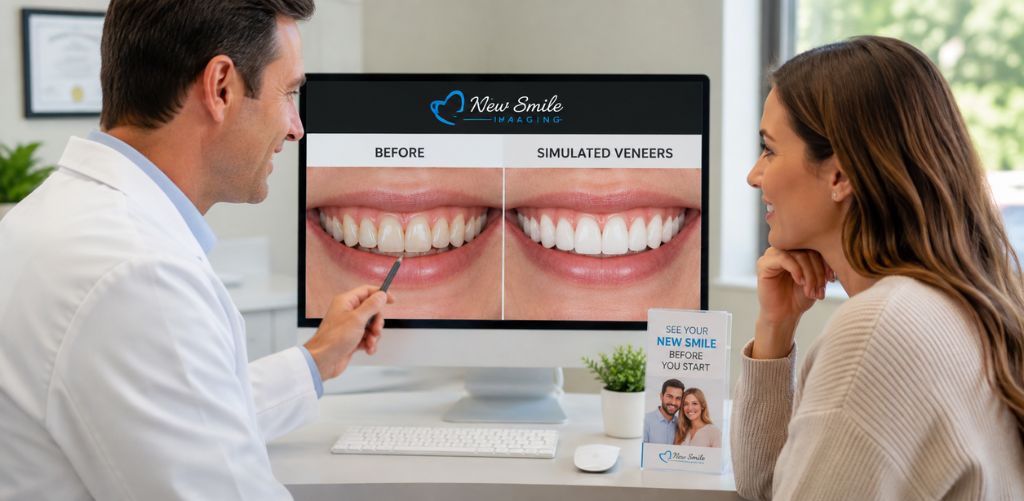
Instead of asking patients to visualize a potential result from a verbal explanation alone, dentists can create a simulated before-and-after image showing how a patient’s smile could potentially look after cosmetic treatment.
With SNAP cosmetic dentistry imaging software, dental practices can create a realistic cosmetic simulation in less than a minute, giving patients a visual starting point for discussing veneers before treatment begins.
What Is Veneer Simulation Software?
Veneer simulation software is cosmetic dental imaging technology that allows dentists to create a visual preview of how a patient’s smile could potentially look after veneer treatment.
The process begins with a photograph of the patient. The dental team then uses cosmetic imaging software to modify the appearance of the smile and create a simulated result.
Depending on the patient’s needs and the capabilities of the software, a simulation can help illustrate potential cosmetic changes involving:
- Tooth shape
- Tooth length
- Smile symmetry
- Tooth color
- Visible spacing
- Overall smile proportions
- The appearance of multiple veneers across the smile
The result is typically presented as a before-and-after comparison.
For the patient, that can make the conversation much easier to understand.
Instead of hearing only, “Veneers could improve the proportions of these teeth,” the patient can see a visual representation of what that type of change might look like.
Can Dentists Show Patients What Veneers Will Look Like Before Treatment?
Yes. Dentists can use cosmetic dental simulation software to create a visual approximation of how a patient’s smile may look with veneers before treatment begins.
This is different from promising an exact clinical outcome.
A veneer simulation should be presented as a visual communication and treatment-planning aid, not a guarantee of the final result.
Actual veneer outcomes depend on many clinical and aesthetic factors, including tooth structure, bite, gum tissue, preparation requirements, materials, laboratory fabrication, and the treatment plan developed by the dentist.
The value of the simulation is that it gives the dentist and patient a much clearer visual reference for discussing the patient’s cosmetic goals.
Why Is It Difficult for Patients to Visualize Veneers?
Patients rarely think about smiles using the same terminology as dental professionals.
A dentist may discuss:
- Tooth proportions
- Incisal edges
- Midlines
- Gingival contours
- Shade selection
- Diastema closure
- Tooth length
- Facial symmetry
Those concepts may be perfectly clear to the clinical team.
For the patient, however, they can remain abstract.
A patient may understand that veneers can change the appearance of their teeth without being able to picture how those changes will affect their entire smile or face.
This visualization gap matters because veneers are an elective cosmetic treatment that can involve a significant personal and financial decision.
Showing a patient a simulation can help turn an abstract discussion into a visual conversation.
How Does Veneer Simulation Software Work?
The exact workflow depends on the platform, but cosmetic veneer simulation generally follows a simple process.
1. Take a Patient Photo
Start with a clear, full-face photograph that shows the patient’s smile.
Using the patient’s actual photograph is important because the purpose of the simulation is to help the patient visualize cosmetic changes in the context of their own appearance.
2. Create the Veneer Simulation
The dental team uses the simulation software to modify the appearance of the teeth based on the cosmetic changes being discussed.
The objective is not to replace the dentist’s clinical treatment planning.
Instead, the simulation helps visually communicate a possible cosmetic direction.
3. Show the Before-and-After Comparison
The patient can then compare their current smile with the simulated version.
This is often where the consultation changes.
Questions that were previously difficult to answer verbally can become easier to discuss when both the dentist and patient are looking at the same visual reference.
4. Discuss the Patient’s Preferences
The simulation can help open a more productive conversation about what the patient actually wants.
For example:
“Do you prefer a brighter shade?”
“Would you like the front teeth to appear slightly longer?”
“Are you looking for a dramatic transformation or something more natural?”
The dentist still determines what is clinically appropriate, but the visual helps the patient communicate their aesthetic preferences.
5. Let the Patient Take the Simulation Home
With SNAP, practices can provide patients with a Smile Evaluation Photo that they can take home and share with a spouse, partner, family member, or friend.
That can be particularly useful with elective cosmetic treatments such as veneers because patients often want input from someone they trust before making a decision.
Why Use Veneer Simulation Software During a Cosmetic Consultation?
The primary advantage is simple:
It helps patients see what the dentist is talking about.
But that improvement in communication can benefit several parts of the consultation.
It Makes Veneer Treatment Easier to Understand
Showing patients photographs of successful veneer cases can be useful, but those photographs still show someone else’s smile.
A personalized simulation answers a different question:
“What might veneers look like on me?”
That makes the discussion more personally relevant.
It Helps Dentists Explain Aesthetic Possibilities
Words such as “symmetry,” “proportion,” and “shape” become much easier to understand when the patient can see them represented visually.
Rather than relying entirely on dental terminology, the dentist can point directly to the simulated smile.
It Can Reveal What the Patient Actually Wants
Not every patient wants the same type of cosmetic result.
One patient may want a bright, highly polished smile makeover. Another may prefer subtle changes that look as natural as possible.
Showing a simulation gives patients something concrete to react to.
Their response can help the dental team better understand their expectations before moving further into the treatment-planning process.
It Creates a More Interactive Consultation
A cosmetic consultation should not feel like a one-way presentation.
Visualization encourages the patient to participate.
Instead of simply listening to what veneers can do, the patient becomes involved in discussing what they would like their smile to look like.
Can Veneer Simulation Software Help With Case Acceptance?
Veneer simulation software can support case acceptance by helping patients better understand and visualize the potential value of cosmetic treatment, although it cannot guarantee that a patient will proceed with treatment.
Veneers are inherently visual.
Patients are usually not purchasing them because they are excited about porcelain or dental materials. They are interested in how their smile could potentially change.
That makes visualization especially relevant.
When a patient cannot picture the result, the conversation may quickly become dominated by cost.
When the patient can see a personalized simulation first, the treatment discussion has additional context.
The patient is evaluating not only the procedure but also the aesthetic goal they are trying to achieve.
For dental practices, this is one reason cosmetic dentistry imaging software can be valuable as a patient communication tool.
How Fast Can a Dentist Create a Veneer Simulation?
Speed matters in a busy dental practice.
If creating a cosmetic simulation requires a lengthy process, specialized appointment, or complicated staff workflow, it may only be used for a small percentage of patients.
SNAP is designed to create realistic cosmetic before-and-after simulated images in less than a minute.
That speed can make smile simulation practical during regular patient interactions rather than reserving it exclusively for lengthy cosmetic consultations.
A practice can potentially introduce cosmetic visualization during:
- Veneer consultations
- Smile makeover consultations
- New-patient examinations
- Hygiene visits
- Whitening discussions
- Implant consultations
- Conversations about missing teeth
- Other cosmetic treatment discussions
The easier the process is for the dental team, the easier it becomes to make visual communication part of the practice’s normal workflow.
Should Dentists Use Veneer Simulations During Hygiene Appointments?
A hygiene appointment can create an opportunity to discover cosmetic concerns that a patient has never formally discussed.
A patient may mention that they dislike the color, shape, spacing, or appearance of their front teeth without realizing what cosmetic options may be available.
Rather than immediately turning the conversation into a full treatment presentation, the practice can offer a simple visual starting point.
For example:
“Would you like to see a simulation of how your smile could potentially look with cosmetic treatment?”
That question can naturally lead to a conversation about veneers or other appropriate cosmetic options.
If the patient is interested, the dentist can then evaluate the patient’s clinical needs and discuss whether veneers are actually appropriate.
This approach keeps the visualization patient-focused while leaving diagnosis and treatment recommendations where they belong: with the dentist.
Is a Veneer Simulation the Same as the Final Treatment Result?
No. A veneer simulation is a visual approximation, not a guarantee of the patient’s final clinical result.
This distinction should be clear during the consultation.
Simulation software is designed to help patients visualize possibilities and communicate aesthetic preferences.
The actual outcome of veneer treatment can be influenced by factors such as:
- Existing tooth structure
- Occlusion and bite
- Tooth position
- Gum health and contours
- Number of veneers
- Preparation requirements
- Veneer material
- Laboratory fabrication
- Shade selection
- Dentist and laboratory technique
- Individual healing and clinical circumstances
The simulation should therefore support the treatment conversation rather than replace comprehensive examination, diagnosis, treatment planning, or informed consent.
Veneer Simulation Software vs. Traditional Before-and-After Photos
Traditional before-and-after photographs remain useful in cosmetic dentistry.
They demonstrate the dentist’s previous work and can help patients understand what certain treatments may accomplish.
But they answer a different question from veneer simulation software.
Traditional case photos show: “What did veneers look like for another patient?”
A personalized veneer simulation shows: “What could a similar cosmetic change potentially look like on my smile?”
Both can play a role in a strong cosmetic consultation.
The advantage of personalized simulation is relevance. The patient is looking at their own face rather than trying to imagine how another person’s result might translate to them.
What Should Dentists Look for in Veneer Simulation Software?
When comparing veneer simulation software, dental practices should consider more than image quality alone.
The software also needs to work efficiently in a real dental office.
Important questions include:
- How quickly can the software create a simulation?
- How difficult is it for staff to learn?
- Can team members use it during normal patient appointments?
- Does it create personalized before-and-after images?
- Can patients take or receive their simulation?
- Can it simulate treatments beyond veneers?
- Does it require complicated hardware?
- Is training available?
- Does the workflow fit naturally into cosmetic consultations?
The best software is not necessarily the platform with the longest feature list.
It is the platform your team can actually use consistently with patients.
What Else Can Cosmetic Dental Simulation Software Show?
Veneers may be one of the most obvious uses for cosmetic imaging, but they are not the only application.
SNAP can also be used to create simulations involving cosmetic changes such as:
- Teeth whitening
- Missing-tooth replacement
- Bridges
- Implants
- Periodontal cosmetic changes
- Other smile-enhancement procedures
For practices offering multiple cosmetic and restorative services, this allows the same visualization workflow to support a variety of patient conversations.
How Can Dental Practices Add Veneer Simulations to Their Workflow?
Introducing simulation does not need to mean redesigning the entire consultation process.
A simple workflow might look like this:
Identify interest → Take a photo → Create the simulation → Show the patient → Discuss possibilities → Provide the Smile Evaluation Photo → Schedule the appropriate clinical consultation
The dental team can also establish situations in which offering a simulation makes sense.
For example, a treatment coordinator or hygienist might offer a smile simulation when a patient:
- Expresses dissatisfaction with their smile
- Asks about veneers
- Mentions tooth discoloration
- Wants to close visible gaps
- Asks about changing tooth shape
- Is considering a smile makeover
- Has previously postponed cosmetic treatment
The goal is not to pressure every patient into cosmetic dentistry.
It is to make it easier for interested patients to understand what cosmetic treatment may potentially accomplish.
Frequently Asked Questions About Veneer Simulation Software
What is the best way to show a patient what veneers will look like?
A personalized cosmetic simulation is one way to help patients visualize how veneers could potentially change their smile. Unlike generic before-and-after photographs, veneer simulation software uses the patient’s own image to create a visual approximation of a possible cosmetic result.
Can you preview veneers before getting them?
Yes. Dentists can use cosmetic dental imaging or veneer simulation software to create a visual preview before treatment. The simulation is intended for visualization and communication and should not be interpreted as a guarantee of the final clinical outcome.
What is veneer simulation software used for?
Veneer simulation software helps dentists visually demonstrate potential cosmetic changes involving tooth shape, color, size, proportions, spacing, and overall smile appearance. It can also help patients communicate their aesthetic preferences during a cosmetic consultation.
Does veneer simulation replace digital smile design or treatment planning?
No. A cosmetic simulation is a patient communication and visualization tool. It does not replace a clinical examination, diagnosis, digital treatment planning, laboratory planning, or the dentist’s professional judgment.
How long does it take to create a veneer simulation?
The time varies by software. SNAP from New Smile Imaging is designed to produce realistic cosmetic before-and-after simulated images in less than a minute.
Can dental staff create veneer simulations?
That depends on the software and the practice’s workflow. SNAP is designed with a simple workflow and training resources so dental teams can incorporate cosmetic simulations into patient interactions efficiently.
Can patients take their veneer simulation home?
With SNAP, dental practices can give patients a Smile Evaluation Photo to take home. Patients can then review the potential cosmetic change and share the image with a spouse, family member, or friend.
Can smile simulation software show treatments other than veneers?
Yes. Cosmetic simulation software can be useful for multiple aesthetic and restorative conversations. SNAP can simulate veneers, whitening, missing-tooth replacement with bridges or implants, periodontal cosmetic changes, and other treatments.
Help Patients See the Possibilities Before Veneer Treatment
One of the biggest challenges in a veneer consultation is also one of the simplest:
Patients want to know what they might look like afterward.
Clinical explanations are important. Before-and-after case photographs are useful. Models and treatment plans have their place.
But none of them completely replaces the impact of showing patients a potential cosmetic transformation using their own smile.
Veneer simulation software gives dentists another way to bridge that communication gap.
With SNAP cosmetic dentistry imaging software, dental practices can create realistic cosmetic before-and-after simulations in less than a minute and provide patients with a Smile Evaluation Photo they can take home.
For dentists who regularly discuss veneers, smile makeovers, whitening, implants, and other cosmetic treatments, that visualization can become a simple addition to the consultation workflow.
Want to see how SNAP works with your own cosmetic cases? Try the free SNAP demo and create a simulated before-and-after smile for your practice.